
Disclaimer: This article/guide/resource is to be used for informational purposes only and does not constitute financial, business, legal or tax advice. Individuals/businesses should consult with their own accountant, business advisor, or tax advisor with respect to matters referenced in this article/guide/resource. Affinity Ledger assumes no liability for actions taken in reliance upon the information contained herein see [Terms and Conditions]. Copyright: All Works on displayed on hubpoint.info are copyrighted unless otherwise stated:
Single Entry Accounting System for Small Business
Single Entry Accounting System for Small Business
Do you want to use a simple Single Entry Bookkeeping System to produce your small business accounts? Success lies in setting up the basics for recording and also carrying out essential tasks consistently. Most importantly ensuring that every business transaction be it income, expense or drawings is recorded.
Setting up a Simple System
Setting up a single entry bookkeeping system is very straightforward. Most of the items needed will be readily available whilst others (if required) are easy to source.
- Cash book paper or electronic
- Sales receipt book or invoice book
- Calculator
- Petty cash tin
- Files to store business documents
Business Bank Account
Keeping business and personal cash separate is vital to the success of your bookkeeping activities. This is where a business bank account will be beneficial. It provides the ability to track money coming in and going out and the capacity to view the balance at any given time.
The Cash Book in Single Entry Bookkeeping
The cash book is the most important element in the single-entry bookkeeping system. Recorded here are all the incoming and outgoing transactions for your business.
The basic cash book shown below is for sole trader running a dog walking and visiting business in the first month of trading. Recorded here are the basic records using a simple system of money coming in, money going out and drawings.
The accounting method used in this example is cash accounting and assuming NON VAT registered business.
Opening Balances
If this is your first month of trading then you will not have any opening balances so just record sales and purchases from the date they take place. The cash book above can be used as a guide.
The cash book is used to record sales and expenses which form the basis of the profit and loss account. Items such as money invested by owner, or assets purchased such as vehicles or machinery should not be entered into the cash book. A separate ledger is required for these types of transactions.
Recording Income (Money In)
In a single entry bookkeeping system there is a specific place to enter income or money coming in to the business, this is in the cash book.
Record all money coming in to the business into the income section, as detailed below. The key here is to enter all income from whichever source.
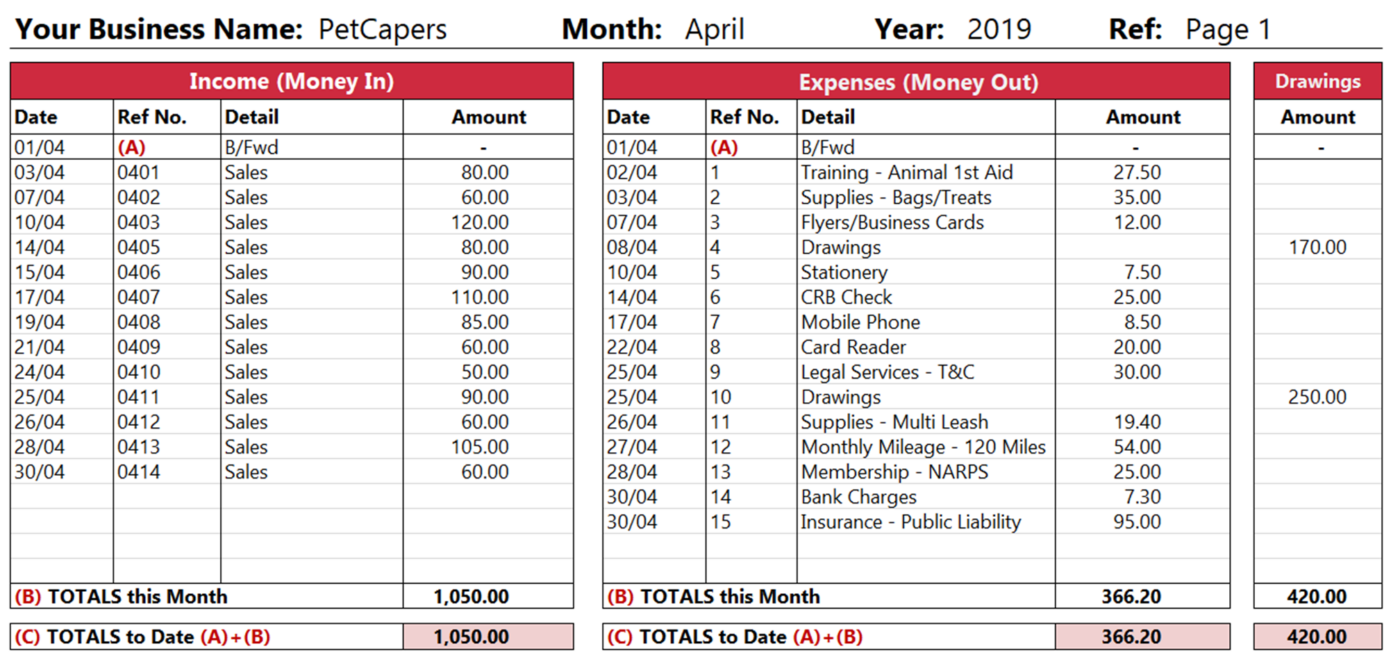
Writing up the Income Section of your Cash Book
You should have a source document for every transaction entered in the cashbook. In the case of the income section this will be a cash receipt or invoice.
Starting with the first column in your cash book enter the date the transaction took place which would be the date the money was received.
In the next column enter the invoice number or any other reference relating to the transaction. Finally entering the amount received from the customer in the last column in the income section.
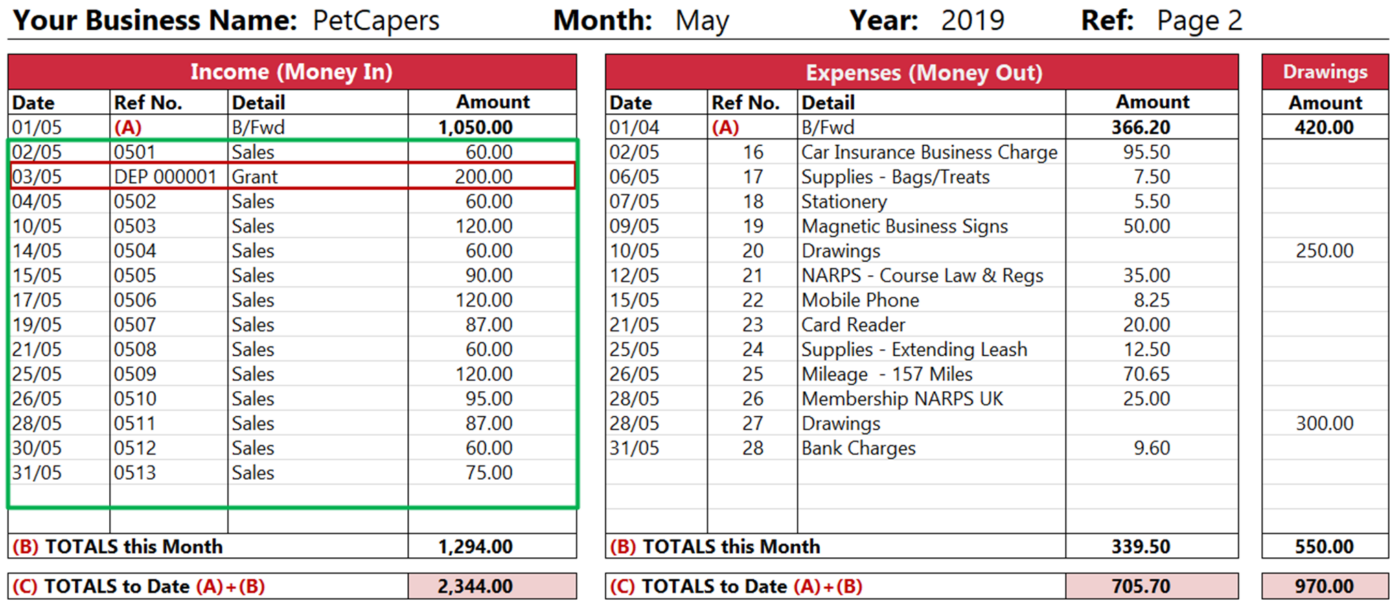
When we refer to the example above, we can see that on 03/05 there is a transaction for £200.00, referenced as DEP00001. This is a cheque received for a business grant. Although not a sale it is still money coming into the business and therefore should be recorded the same as ordinary sales.
Recording Expenses (Money out)
During the course of the month you will undoubtedly incur expenses when running your business. The key here is to record all expenses regardless of whether they are cash, cheque or card.
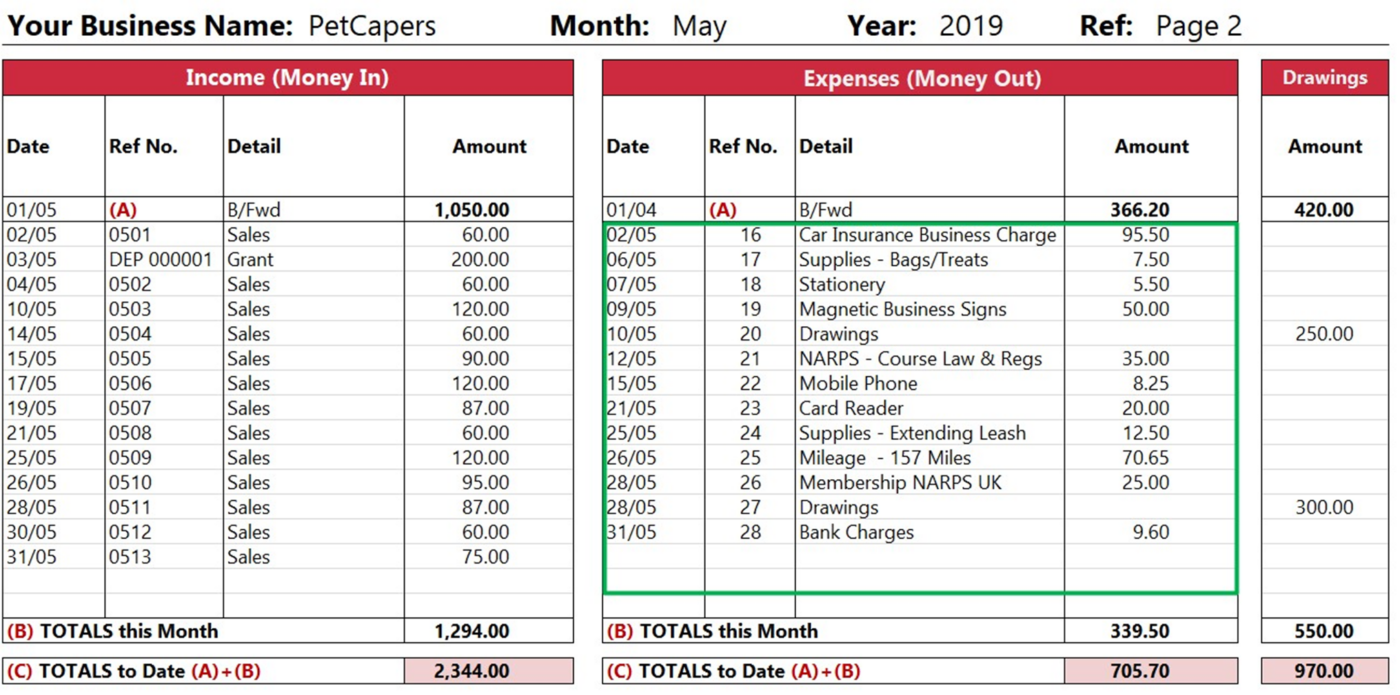
Basic Cash Book – Expenses Section – by affinityledger.com
Writing up the Expenses Section of your Cash Book
Starting with the first column of the cash book. Enter the date the transaction took place which would be the date on the receipt. Next enter a unique reference number or the receipt number. You may wish to use the simple numerical referencing system as shown in the example.
Tip: Write the number from the cash book on the receipt. Using this method of cross referencing can be useful when trying to locate a transaction.
In the third column enter a short description of the expense. This could be something like, mobile phone or public Liability insurance. Finally in the last column enter the total amount detailed on your receipt. This could something like 50.00 which is the gross price (Including VAT) shown on the bill for the magnetic business signs.
Tip: Print Bank Transfer and internet purchase receipts and put them with your cash book for entering later this will save time and keep you organised.
Owners Drawings
During the course of the month you will more than likely take money from your business for your own personal use.
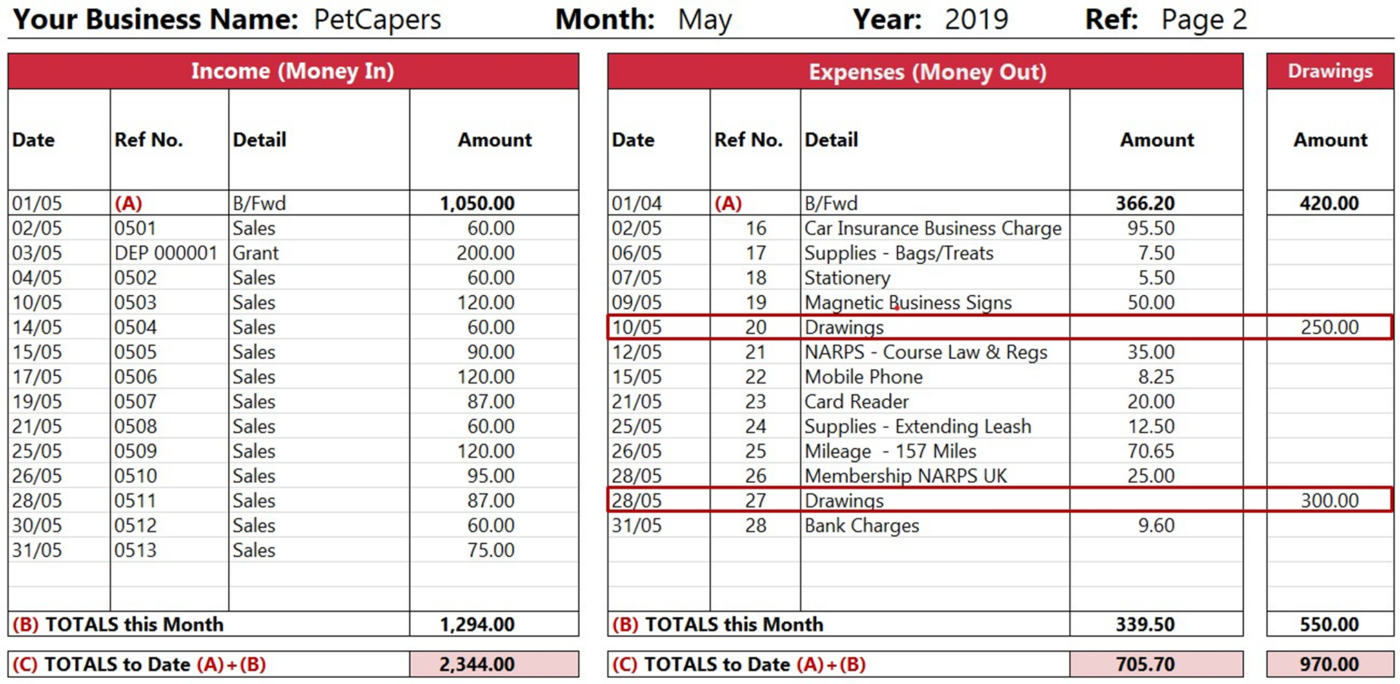
Basic Cash Book – Entries for Owners Drawings – by affinityledger.com
Writing up the Owners Drawings section of your Cash Book
Record owners drawings in the same way you record expenses. The only difference is that the amount is entered in a separate column.
What is not an Expense!
It is very important to point out that not all purchases are classed as expenses. The single entry system will almost certainly work well with sales and expenses to produce a profit/loss statement.
Lets take a common example, a business purchases a van for around £1.500. The logical thing to do is record this as an expense in the cash book. This is the wrong thing to do. The van is not an expense, even though it is something that has been purchased. It is classed as an asset to the business.
If you are looking at buying items that can be resold then they would be recorded on a balance sheet as an asset, please look at our section on double entry bookkeeping for further information on this.
The Bank Statement
At the end of May you receive your bank statement. Regular use of online banking means that you have already entered most of the transactions listed on the bank statement.
Tick all entries in the cash book that match with the bank statement. Record entries present on bank statement but not in cash book such as direct debits, online debit card payment and bank charges.
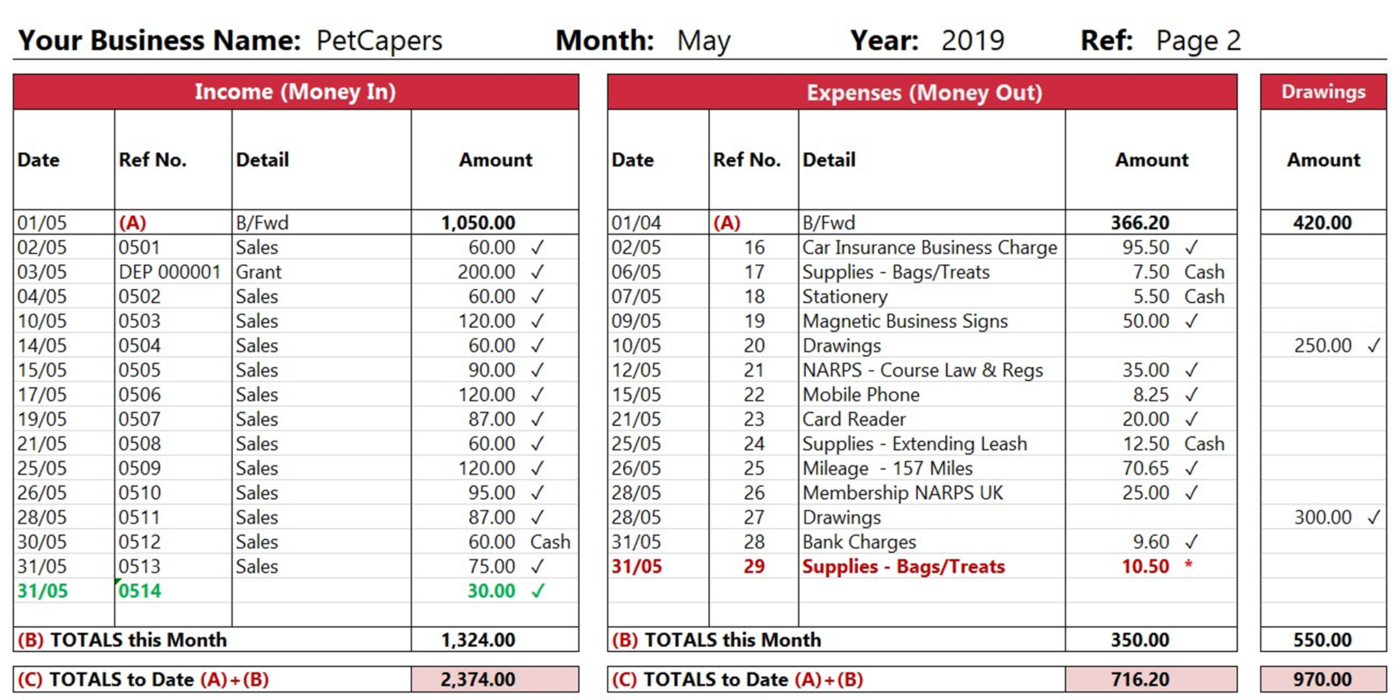
Simple Bank Reconciliation – Ensuring all Entries a Captured – by affinityledger.com
Simple Bank Reconciliation System
Checking your bank statement you note a sales transaction dated 31/05 for 30.00. This transaction is not in your cash book. On the next available line in the income section record this transaction as per example above in green.
Recorded on 31/05 is a debit card transaction for 10.50 showing in your cash book but not on your bank statement. This transaction has not cleared in your bank and may take another day or two to show.
Bank reconciliation is a vital task in the single entry bookkeeping system. Ensuring you include bank transactions in the cash book in particular direct debits. Failing to record these transactions will lead to inaccuracies in reporting, the income statement and ultimately self assessment.
Balancing the Cash Book
A vital end of month task is to balance the cash book. Firstly and most importantly make sure all the monthly transactions have been recorded and the brought forward balances are correct (A).
The next stage in the balancing process is totaling all the column entries in (B) “Totals this Month”. Once you are satisfied the totals entered are correct and complete, then it is time to move on to the next stage of the balancing process.
Finally add the “b/fwd balances” from the previous month (A) to the “Totals this Month” (B) to get the “Totals to Date” figure. With the final “Totals to Date” figures forming the basis for your income statement.
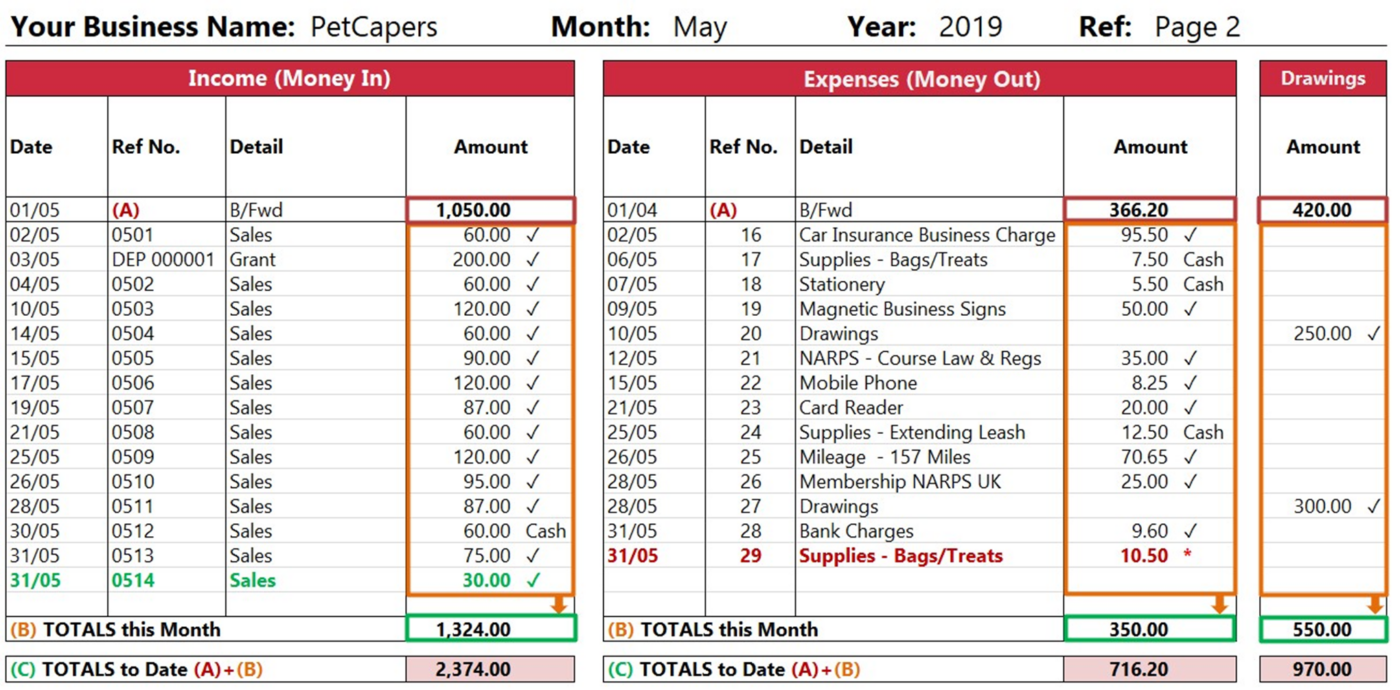
Basic Cash Book – End of Month Balancing – by affinityledger.com
If you have been trading in the previous month then you will have balances to bring forward. When you first month of transactions are complete and all is reconciled, take the closing balances and transfer to the following month. Enter the figure into the corresponding columns and you are ready to start recording for the current month.
Income Statement
Download: Would you like a printable copy of this basic cash book for your own use? Or perhaps a more detailed cash book?
Its the end of the year, and if you have kept you cash book up to date and entered all business transactions then you have done a good job! The result of your recording will be a “grand total” for sales, expenses and drawings.
You now have the essential information required for a simple income statement, which is the ultimate aim of single entry bookkeeping.
For taxation purposes you may be able to reduce any profit by claiming allowable expenses, such as home business expenses this is explained in another section.


